Metrici LPR – LuxRiot Export Script
Integration Guide for LuxRiot VCA

luxriot_lpr.php, a helper that receives a License‑Plate‑Recognition (LPR) HTTP POST request from a Metrici LPR engine, validates it, builds a JSON payload and forwards it to a LuxRiot VCA server using Digest authentication.
1. Overview
- Accepts a set of POST fields describing a vehicle detection event.
- Validates required fields and authenticates the request using a per‑camera
authkeystored in the MySQLgeneral_camerastable. - Creates a JSON metadata payload for VCA (Vehicle‑Count‑Analytics).
- Performs a two‑step Digest authentication against the LuxRiot server and pushes the payload.
2. POST Fields (sent in the request body)
| Field | Description | Required? |
|---|---|---|
id | Camera identifier (integer) | Yes |
number | Detected licence‑plate number | Yes |
country_code | Country code of the plate | Yes |
first_seen | Timestamp when the plate was first seen | Yes |
last_seen | Timestamp when the plate was last seen | Yes |
probability | Confidence (0‑1) | Yes |
direction | Vehicle direction (e.g., "in", "out") | Yes |
plate_image | URL or base64 image of the plate (optional) | No |
car_image | URL or base64 image of the vehicle (optional) | No |
transactionkey | Transaction identifier for the event | Yes |
gps_latitude | Latitude (optional) | No |
gps_longitude | Longitude (optional) | No |
have_companion | Flag indicating a companion plate (optional) | No |
companion_image | Image of companion plate (optional) | No |
weight | Vehicle weight (optional) | No |
speed | Vehicle speed (optional) | No |
triggerkey | Key identifying the trigger source (optional) | No |
vehicle_class | Vehicle class string (e.g., "car") | No |
vehicle_color | Vehicle colour string | No |
vehicle_maker | Vehicle manufacturer string | No |
plate_bbox | Bounding box coordinates in format x;y;width;height (e.g., "0.3;0.4;0.2;0.1"). Used to position the metadata overlay. Defaults to center (0.5;0.5;0.2;0.1) if not provided. | No |
auth | MD5 hash calculated from a concatenation of several fields (optional – if omitted the script computes it) | No |
auth hash automatically if it is not supplied. If plate_bbox is provided, the script parses the coordinates and uses them to position the license plate metadata overlay in the LuxRiot VCA system. The coordinates should be relative to the car image dimensions.
3. Authentication Process
- Retrieve the camera‑specific
authkeyfrom the MySQL tablegeneral_camerasusing the suppliedid. - Build a concatenated string using the fields listed in the source code (see
authStringin the script) and the retrievedauthkey. - Compute
md5($authString). The suppliedauthfield must match this hash; otherwise the request is rejected withWrong authentication.
After the POST validation, the script performs a HTTP Digest authentication with the LuxRiot server. The steps are:
- Send an initial
POSTrequest to/clientApi/VCA/{targetid}/pushMetaDatato obtain a401response containing aWWW-Authenticateheader. - Parse the
realmandnoncevalues from that header. - Calculate the Digest
responseusing the helpercompute_digest_response()(MD5‑based as implemented in the script). - Issue the final
POSTwith the JSON payload and the constructedAuthorization: Digest …header.
4. GET Parameters (required in the query string)
| Parameter | Description |
|---|---|
server | Base URL or IP of the LuxRiot server (e.g., http://10.0.0.5) |
port | Port on which the server listens (e.g., 80 or 443) |
user | Username for Digest authentication |
pass | Password for Digest authentication |
targetid | VCA target identifier used in the endpoint URL |
displaytimelive | Optional – display time (ms) for live view (used in plate metadata) |
displaytimearchive | Optional – display time (ms) for archived view (used in plate metadata) |
server, port, user, pass) are missing the script returns HTTP 400.
5. Configuration Example
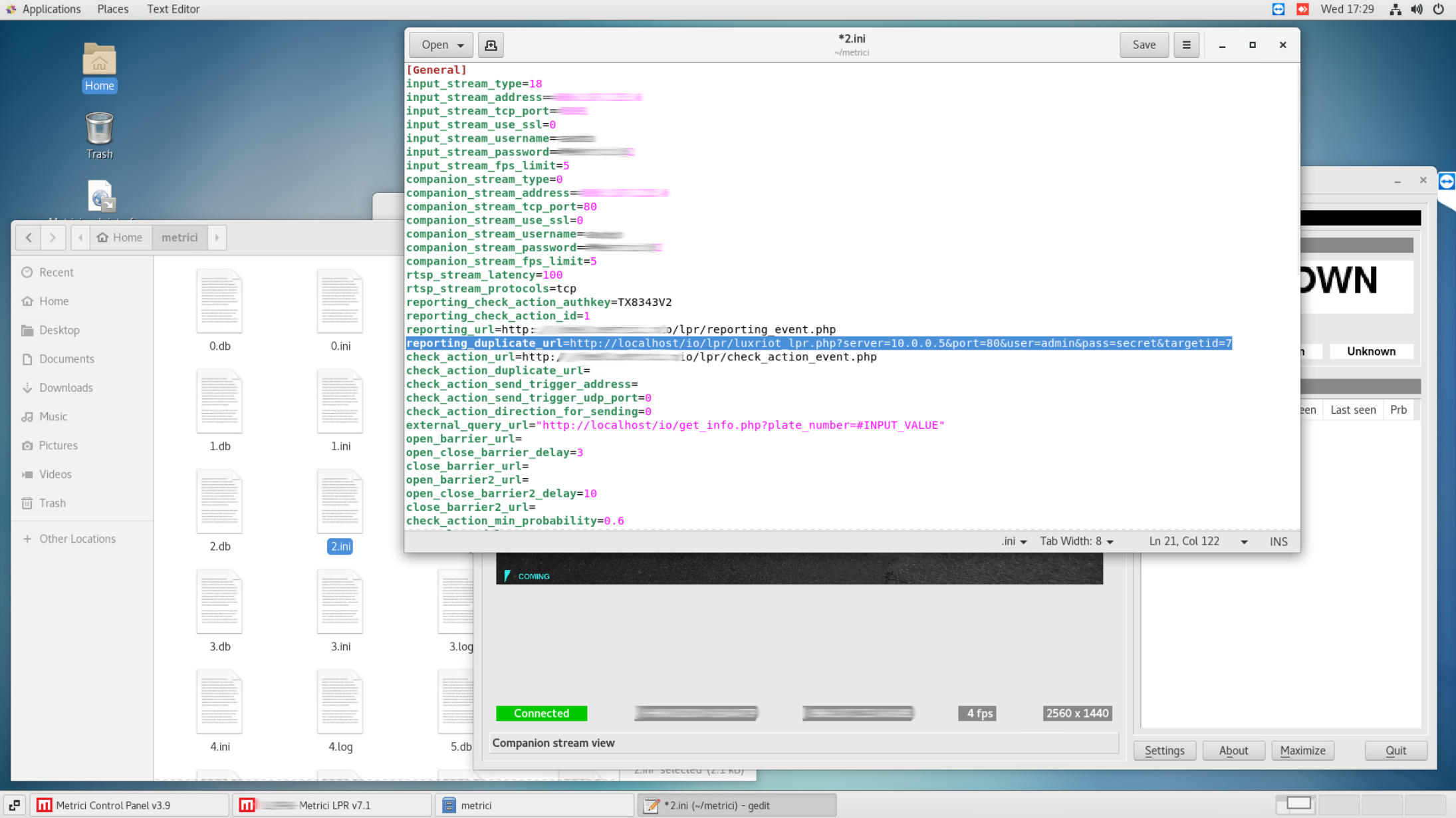
Below is an example configuration showing how to set up the Metrici LPR engine to send events to this script. For this you should navigate to the /home/metrici/metrici folder and open the corresponding .ini file. Then you can change the reporting_url key value, or better to add the address of this script to the reporting_duplicate_url key.
6. Usage Example (cURL)
The following example shows how to call the script from the command line. Replace placeholder values with real data.
curl -X POST \
  -d "id=12" \
  -d "number=ABC1234" \
  -d "country_code=US" \
  -d "first_seen=2024-09-19T10:15:00Z" \
  -d "last_seen=2024-09-19T10:15:05Z" \
  -d "probability=0.96" \
  -d "direction=in" \
  -d "transactionkey=tx12345" \
  -d "plate_bbox=0.3;0.4;0.2;0.1" \
  "http://yourhost/luxriot_lpr.php?server=10.0.0.5&port=80&user=admin&pass=secret&targetid=7"
The script will respond with one of the following HTTP status codes:
- 200 – Metadata successfully sent.
- 400 – Missing required POST or GET parameters.
- 401 – Authentication failed (wrong
authhash or Digest credentials). - 500 – Server error or unexpected response from the LuxRiot endpoint.
7. Response Format
On success the script outputs a plain‑text message:
Metadata sent successfully
On error it prints a human‑readable message and sets the appropriate HTTP status code (see the list above).